Brickglide
For the TrimUI Brick · R36 · PortMaster

Chords that glide.

An ambient machine. Press a chord and five voices slide into it and hold it; press the next and every voice travels there. Let the progression play and the buttons become a melody that always fits; the stick strums and arpeggiates. Plug in a MIDI keyboard or an Orchid, drop in your own samples, and it all glides.

Free and open source. Same engine and the same seven buttons as Brickchord; the third app in the family after Bricklab.

New in v0.5.0: no sticks needed.Brickglide now plays on the original TrimUI Brick and other handhelds without analog sticks, and installs on R36 handhelds and any firmware with PortMaster. F1 and F2 stand in for the sticks: tap one to click, hold it and use the D-pad to push. How it works

GLIDE GUIDES C Major

Tap a chord. Tap another and listen to the voices slide. Headphones help.

What you see

Every glide, drawn as it happens
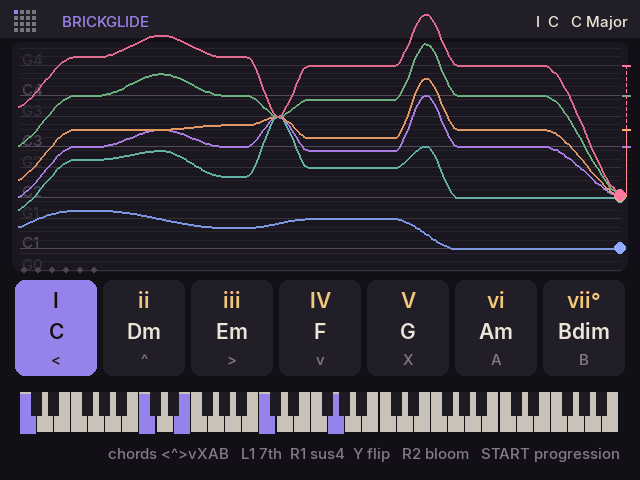
The Brickglide screen: five coloured lines gliding between chords over guide lines for the scale, and seven chord tiles below
The glide guides. Each line is a voice; the dashed mark at the right edge shows where it is headed.
  • The voices. Five of them, each with its own sound, plus a sub an octave under the bass. The bass always takes the root.
  • The guides. Faint lines for every note of your key, roots and fifths named, so you can see a voice land on a chord tone.
  • The spectrogram. Click the left stick and the screen draws the real sound instead: every harmonic of every voice as a crisp line.
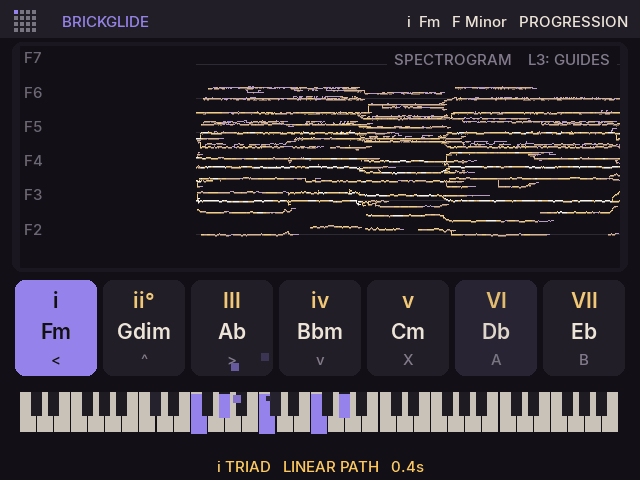
The Brickglide spectrogram view: thin violet and gold lines, one per harmonic, bending as the chords change
Spectrogram view, L3. Lines, not a heat map.
  • The Move compass. Hold the left stick in a direction and press a chord: up falls in from above, right cascades upward, down-right blooms, down swoops. Push further for a longer glide.
  • Cloud. Hold L2 and the left stick becomes a compass of granular textures, from Dust to Freeze.
  • Effects. Big Hall and tape echo by default; chorus, wide, tape wobble, filter drift, drive and lo-fi in Settings.
START, then play

A melody that always fits

Brickglide while the progression plays: the seven tiles show melody notes, with the current chord's own tones marked
While the progression plays, the tiles are melody notes; the chord's own tones are marked in gold.

Set up a progression, press START, and Brickglide plays the chords on its own, gliding. Now the seven buttons are melody notes, and they follow the harmony: buttons 1, 3 and 5 are always the current chord's tones, so nothing you press is wrong. Press a note while holding another and the melody glides between them.

Strum, sideways

Sweep the left stick left and right and it plucks through the chord, low to high, like a harp or an Omnichord plate.

Arpeggiate, up and down

Push up and the chord climbs, down and it falls; the further you push, the faster. Bounce, random and root-and-up patterns, one to four octaves.

Its own instrument

Harp, kalimba, bell, marimba, glass, music box, pluck synth or nylon, up to 250% loud, with its own reverb and echo, separate from the pads.

One sound, or five

Give every chord voice the same sound in one move, or a different one each. L1 and R1 move the melody by octaves; R2 and a button changes the chord by hand.

Bring your own

MIDI, samples, and the room

USB MIDI in

Plug a class-compliant keyboard or controller into the Brick's USB-C. Play chords on it and the voices glide into them, then hold. Tested with the Telepathic Instruments Orchid. Brickchord and Bricklab take MIDI too.

Your samples as pads

Drop WAVs into the samples folder (Brickglide's, Bricklab's or Brickchord's) and they become sounds that sustain and glide through your chords, tuned from the note in their file name.

Loops as beds

A loop in its own key becomes a bed under everything, moved into your key and trimmed to whole bars so it loops cleanly.

Texture beds

Rain, brook, wind, vinyl and tape hiss play underneath, with their own level. Add your own field recordings.

Hold R2 and press a chord

Eight ways to get there

A plain chord button glides straight to the next chord. Hold R2 and the voices take the long way, with whichever Move you have chosen. A progression can use them on every change.

Bloom

Every voice draws together on one low note, then fans out into the chord while the filter opens.

Cascade

The voices arrive one at a time, from the bottom up or the top down.

Spiral

Each voice goes round through an octave, alternating up and down, and settles.

Swoop

All the voices dip an octave, then rise into the chord.

Scatter

Each voice takes a detour through a random note of the scale.

Converge

The voices meet in the middle of the chord, then spread.

Fall

They come down from an octave above.

And the paths

Ten curves for every glide: Smooth, Linear, Ease, Swell, Bounce, Late, Snap, Wobble, Semitones and Scale steps. Five timings: together, by distance, bass lags, bass leads, loose. From a quarter of a second to a minute.

If you know Brickchord, you know this

Seven buttons, one stick

< ^ > v X A B
The seven chords of the key, I to VII. The voices glide in and hold. The same chord again lets it fade.
L1 / R1 / L1+R1 / Y
7th, sus4, 9th, flip major and minor. Held with a chord, as in Brickchord.
LEFT STICK
Sideways strums, up and down arpeggiates. Hold R2 and a chord, then push the stick, and it scrubs the glide instead. R2 + stick (before the chord) is the Move compass; L2 + stick plays Cloud.
RIGHT STICK
Filter and space. Same as Brickchord.
NO STICKS? F1 / F2
Stand in for the left and right stick. Hold F1 and press LEFT or RIGHT to sweep a strum across the chord, UP or DOWN to arpeggiate. More
R2
Bloom. R2 + a chord plays it with your chosen Move.
START
Play the progression; START again stops everything. While it plays, the seven buttons are melody notes that follow the chords.
L3
Glide guides or spectrogram.
SELECT
Settings: voices, chords, moves, melody, scenes, effects. SELECT + a chord button saves a scene; L2 + it recalls one.

New to it? Brickglide opens with a guided demo on first launch: ten moves, one at a time, each waiting until you have done it. Settings > Scenes runs it again, and holds two starters: Glide Chords and Deep Bloom.

Install

Two minutes to install

  1. Download the zip for your handheld from the v0.6.0 release: brickglide-v0.6.0-knulli.zip for KNULLI (TrimUI Brick and Brick Pro), brick-family-r36-v0.6.0.zip for the R36S, R36 Max and other ArkOS-family handhelds (all four apps in one), or brickglide-v0.6.0-portmaster.zip for any firmware with PortMaster (NextUI, NX Redux, muOS, ROCKNIX and more).
  2. Unzip it and copy everything inside into roms/ports on the SD card (over the network share or with a card reader). PortMaster zips can also go in through PortMaster's own installer.
  3. Update Gamelists on the device. Brickglide appears under Ports.
  4. On first launch, press each button once and push each stick once so it learns your controls. No sticks? It asks for the two buttons to use instead (F1 and F2 on the Brick), then follow the guided demo.

No sticks? F1 stands in for the left stick and F2 for the right. Tap one to click that stick; hold it and use the D-pad to push the stick, stronger the longer you hold. Brickglide's strum sweeps across the chord while you hold the direction. It turns on by itself when no sticks are found, and the on-screen hints name the buttons. Settings > Global > Sticks switches it on or off, and Stick buttons picks different buttons. Brick Pro owners can try it there too.

Brickglide, Bricklab and Brickchord install side by side and share a sound cache. Tested on knulli-a133-trimui-brick-pro-beta-20260921.